
01 · Enabling the module from Piztu
Tao does not come «inside» Piztu. It is an external module: a standalone application with a modulo.json file that Piztu discovers in the modules folder. That matters for understanding the rest: Piztu simply finds it, shows it and launches it.
To make it appear in Piztu I go to ⚙ Classroom → Modules. There I see both the already-installed modules and the ones in the catalogue. I tick its box to enable it. The state is saved in Piztu’s settings, so it survives restarts.
Once enabled, the Tao button appears in the Piztu bar. One detail worth knowing on day one: when you press it, Piztu closes and Tao stays on screen. This is not a bug: Tao is a full-screen application that replaces the map, not a companion. If you want to open it without closing Piztu, use Ctrl + click.
02 · Installing Tao on the students’ computers
So far Tao is only on the teacher’s computer. Students need their own Tao at every workstation, since it is the software that lets them answer the practicals, or that serves to save practicals that are still being edited and not yet finished. The Piztu installer already does this once (Step 8), but new machines, reinstalls and the laptop that happened to be switched off that day always turn up. For that there is a hot action from the map:
- The ⚙ button on Tao’s row inside ⚙ Classroom → Modules, or
- A long press (3 s) on the Tao button itself in the bar.
03 · What it is really for
Tao is the students’ class notebook, but in a digital, verifiable format. Each student signs in with their own account and has, per subject:
- A daily log in Markdown (with preview and images): what they did today, what problems they ran into and how they solved them.
- Working files attached to the session.
- Messaging with the teacher and incidents (positive, negative, expulsion, disorder). The latter are visible to the student on purpose: if I record something, I want them to know.
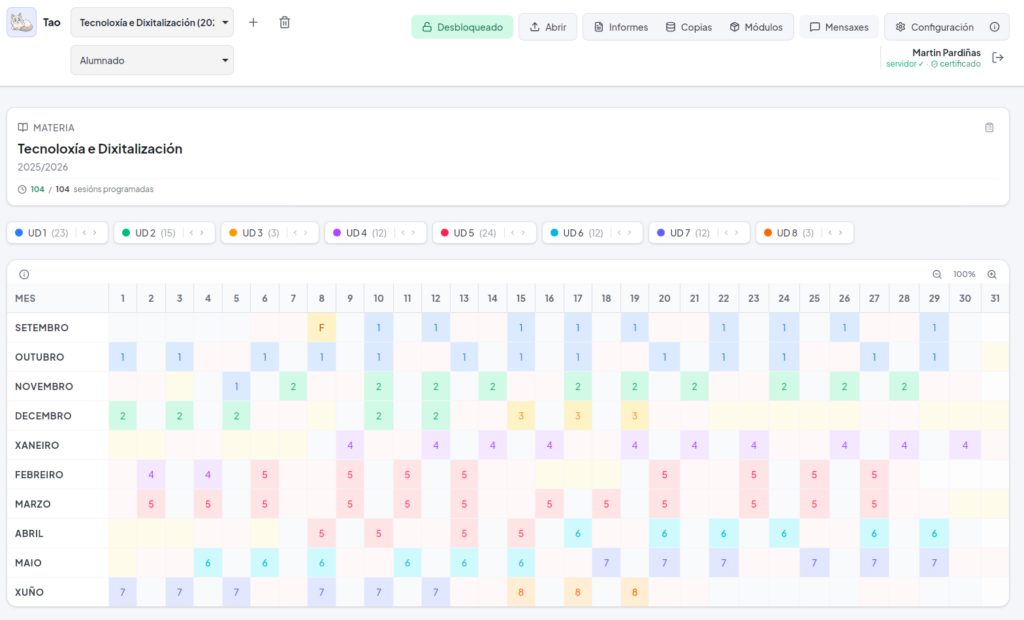
- The subject calendar and syllabus: I can even paste the URL of the DOG decree and Tao extracts the start date, the end date and the non-teaching periods to fill in the table (which I then check by hand, since the DOG rewords it every year).
And a key architectural decision for maintenance: there is no database. Everything is files on a File Browser server. A backup consists, quite simply, of copying a folder.
04 · The digital signature as a teaching resource
This is the part colleagues ask me about most. Students do not hand in just any PDF: they hand in a PDF signed cryptographically with their own certificate.
How they get a certificate
There is a department certificate authority (CA). When a student changes their password, Tao generates a personal certificate for them signed by that CA, packages it as a password-protected .p12 and uploads it to their folder on the server. There is no paperwork, no FNMT, no forms: it is completely transparent to the students and happens on their own computer.
How they sign a practical
In the report, the student chooses the scope, reviews the content and clicks sign. Tao renders the PDF, adds the signature vertically in the left margin of every page with the date, signs it with PAdES and uploads it to the server. The signer’s name is read straight from the certificate.
Why it makes copy-and-paste harder
The report is not saved to the desktop to be sent later by whatever means: it is published on the server, signed, with the session date and with the SHA-256 checksums of the files uploaded that day. Work copied from a classmate can still be copied, but it can no longer be presented as one’s own without the signature, the date and the hash contradicting the story. And, above all, it forces something very instructive: to sign, you have to write down what you did, session by session, while you are doing it.
In practice, the classroom effect is more pedagogical than policing. Students understand that signing is an act with consequences and learn fundamental concepts hands-on: private key, certificate authority, integrity and non-repudiation.
Technical honesty
⚠️ The department CA is embedded in the client binary. Anyone who extracts the binary can obtain the key and forge certificates. It is an acceptable method for an internal, trusted deployment within the school, but not for use with external legal validity. I explain it to students like this: it is a real rehearsal of a real system, not a national electronic ID.
05 · Individualised content with Yang
If everyone signs their own work, the next step is obvious: everyone should have their own problem statement. That is where Yang comes in, the generator of parameterised exercises built on Maxima and LaTeX. Yang is a standalone application, but when it is opened from Tao it is handed a context and the loop closes on its own:
- Tao: in the day’s session you choose «Edit with Yang», sending it the subject, the date and the student list.
- Yang: it suggests as many iterations as there are students and generates those variants of the exercise, each with different data.
- Yang: through the Distribute option, it pairs each generated variant with a real student from the list.
- Tao: each student finds their task in their session. Nobody has the same problem statement as the person next to them.
When someone needs an adaptation (a more guided statement, a different context or an extension), nothing has to be broken: inside that student’s editor you select the individual «Edit with Yang». Yang detects that only one person is being edited and hides the distribute button; the generated content goes straight to that student.
Zero coupling
If you open Yang on its own (from the Piztu map or by hand), there is no Tao context and the «send to Tao» option is not shown. It is still the usual exam generator. A module should not change its behaviour based on who is looking at it, only on who opened it.
This genuinely saves time. Preparing thirty different problem statements by hand is unfeasible; preparing one parameterised statement and distributing it takes a matter of minutes. On top of that, the «mine was harder» argument disappears: the structure is the same for everyone.
06 · The teacher’s reports
Students generate signed reports of their work with five possible scopes:
| Scope | When it is used in class |
|---|---|
| Session | Practicals from a single session (that day’s submission). |
| Week | Routine monitoring in vocational training cycles. |
| Between dates | A project that does not fit the regular calendar. |
| Unit | Closing a teaching unit, with its number and title. |
| Assessment | The term’s overall submission. |
On the other hand, the teacher’s Progress Reports are the ones that save the most time. Tao keeps a record per session (the work done, or the reason there was none: strike, field trip, absence) and builds:
- Scheduling analysis: planned sessions versus actual sessions per unit, indicating the degree of completion (high / medium / low). It is exactly what departments ask for and what used to be done from memory at the end of the year.
- Per-unit tracking: objectives, contents, assessment criteria, deviations and improvement proposals.
- A monthly classroom record with the detail of the month’s sessions.
- A reasoned report drafted from the record, exportable to PDF, ODT or DOCX to add to the department’s report.
07 · What Tao does not do
Tao stores sensitive information: who is at which computer, the session history, incidents and work. That is why the rest of the ecosystem has no access to it:
- Piztu’s module API never exposes Tao’s data; that code does not even import the Tao package.
- Xesta (the AI assistant that generates administration scripts) is entirely isolated from this loop, being an administration tool.
- When a module needs to know who is at each computer (like Pancho for the inventory reports), the correct route is to ask the teacher for the credentials at that moment, without using embedded administrator credentials.
- To pass practicals to an AI to help with grading, Tao prepares an anonymised copy: each student ends up in a folder identified by an internal UUID, with the lookup table kept outside that folder.