
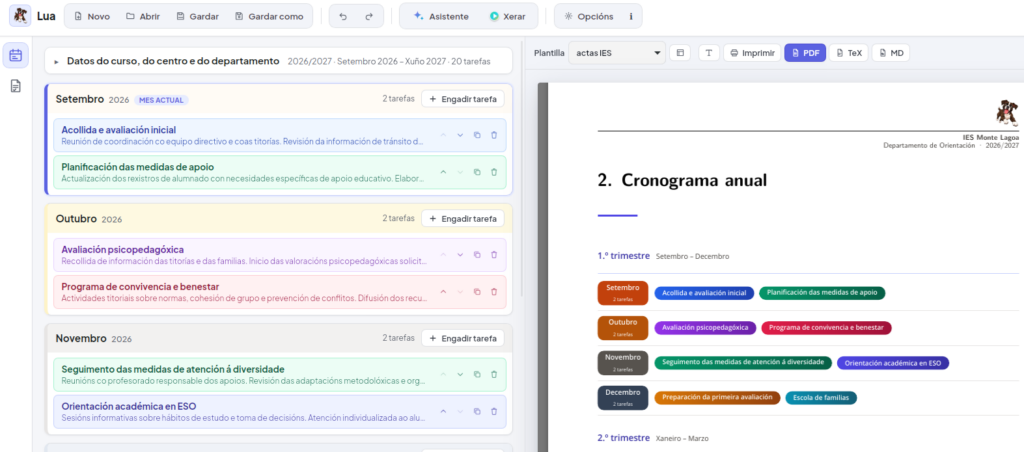
On the left, the months and their tasks; on the right, the generated schedule.
Every school year, subject departments repeat the same routine: updating the schedule, writing up the minutes of each meeting and noting how each subject’s curriculum plan is going. Lua is the Piztu module that handles the mechanical part so teachers can focus on the content.
01 · The problem: paperwork that steals time from teaching
A department’s job isn’t filling in documents: it’s deciding what to teach, how to teach it and with what results. In practice, though, a lot of energy goes into fighting the word processor’s formatting, rewriting headers and cover pages in every document, or reconstructing from memory, in June, what happened in October.
Lua exists to lift that burden.
02 · What Lua does
You type the school, department and year details into a simple form, and Lua produces the complete document —cover page, contents, introduction, body and signature— in the school’s own look. It produces three things:
- The annual schedule. You add each month’s tasks, with a description that can include bold text, lists, links or images, and Lua puts them in order. The schedule is summarised by term on a visual page you can read at a glance.
- The monthly minutes. One for every month of the school year, with attendees, agenda, how the meeting went, agreements, requests and questions, and signatures. You can produce a single set of minutes or the whole year’s book.
- Curriculum tracking. For each subject in the department: content covered, how far the curriculum plan has been followed, results, difficulties spotted and improvement measures. The minutes pick up that data automatically.
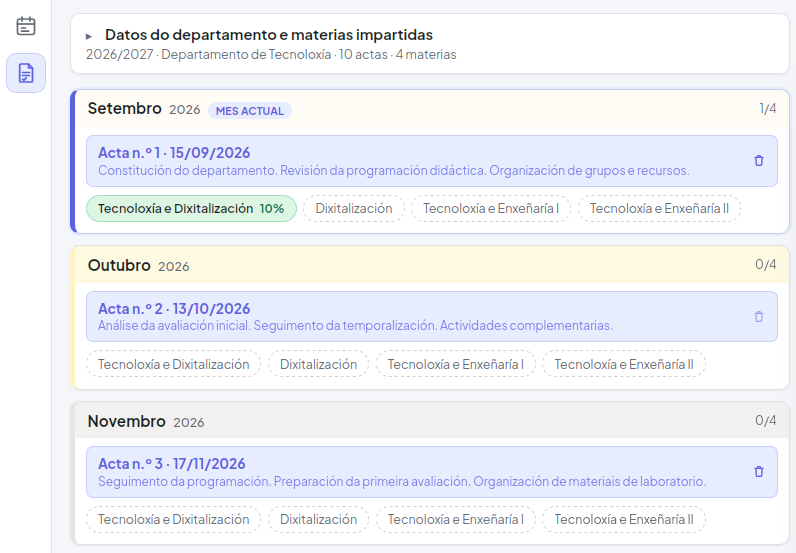
The minutes forms: one per month and, below, the tracking for each subject.
03 · What it adds to teaching work
Saving time is the most visible benefit, but not the most important one. By turning record-keeping into a monthly habit, the department gains:
- Continuous tracking. Noting each month how far the plan has been followed, and what got in the way, lets you spot mismatches in time instead of discovering them at the final assessment.
- An easier end-of-year report. What has been recorded month by month is the raw material for the report and for reviewing the curriculum plans.
- Decisions with a history. Agreements and improvement measures are written down and can be compared from one month to the next: what was proposed, what was done and what came of it.
- Consistency across subjects. They all follow the same structure, which makes coordinating and comparing easier.
- More useful meetings. With less time lost to formatting, more is left for discussing teaching and learning.
04 · One style for the whole school
Presentation is kept separate from content. The school’s look —logo, header, footer, colours, cover page— is defined once in a template. If the school’s image changes, you change it in one place and every document comes out updated. Templates are shared as a single file, so the whole department, or the whole school, can use the same style.
It works for any department, not just Guidance: just type the department’s name and the titles and labels adapt.
The result comes out as a PDF, for printing or archiving, and also as Word and OpenDocument files, for anyone who prefers to tweak it in their own word processor.
05 · An AI assistant that helps without taking control
Lua includes an optional assistant. You can ask it to write an introduction, correct a text, look up legislation in official sources, add tasks to the schedule or —very handy— create the school’s style from a sample document, such as letterhead paper or an old set of minutes.
It works with several AI services (Gemini, Claude, OpenAI and other compatible ones, even ones installed on your own computer) and you choose which to use. Changes can be undone, irreversible actions ask for confirmation, and professional judgement stays yours: the AI suggests, the teacher decides.
06 · See the real result
Here are two sample documents for the 2026/2027 school year, produced with Lua:
- Sample annual schedule (Guidance Department): cover page, contents, schedule by term and a month-by-month breakdown.
- Sample September minutes (Technology Department): agenda, tracking of each subject’s curriculum plan, agreements and signature.
07 · Where it can grow
Lua is designed to take on new kinds of document that share the same logic: variable content on a fixed structure. The department’s annual report, teaching programmes, individual follow-up reports or coexistence and induction plans all fit there.
08 · How to try it
If you have Piztu installed, Lua appears as one more module under ⚙ Classroom → Modules. It also works on its own on Linux, Windows and macOS, and is available in Galician, Spanish, English and Portuguese. You can download the installer from the latest release and see the code in the repository.
Lua is free software under the AGPLv3 licence: it can be used, studied, modified and redistributed.